AI agents can help businesses analyze information, perform tasks, interact with tools, and support business processes. You no longer need to write all the code yourself to start building one. With a visual AI agent builder, you can configure an agent using prompts, tasks, tools, and workflows.

But how do you build an AI agent without coding, and what should you consider before putting it to work?
In this guide, we’ll walk through five practical steps to create an AI agent without coding, from defining its purpose and configuring its instructions to testing it and integrating it into a business workflow.
We’ll also explore how Joget AI Agent Builder, part of the Joget Intelligence AI Suite, helps users build agents visually and connect them to enterprise applications and workflows.
What Is an AI Agent?
An AI agent is a software system that can act on behalf of a user or another system to perform tasks toward a defined goal. Depending on how it is configured, it can interpret instructions, use tools, retrieve information, analyze data, and carry out a sequence of actions.
According to McKinsey‘s explainer on AI agents, AI agents can also coordinate activities, orchestrate complex workflows, and work together to solve problems.
For example, an AI agent could review capital expenditure requests, identify missing information, summarize relevant details, and flag risks for an approver to review. Another could examine application scripts and generate a report of potential issues.
Unlike a basic chatbot that primarily responds to questions, an AI agent can be configured to use tools and perform multistep tasks. Its actual capabilities depend on its instructions, available tools, data access, and permissions.
Can You Build an AI Agent Without Coding?
Yes. No-code and visual AI agent builders let you configure an agent without writing its underlying application code manually. You can define what the agent should do, provide instructions, connect supported tools, and test its behavior through a visual interface.
A no-code AI agent is an AI agent that can be configured through a visual interface or other simplified tools without requiring users to write all the underlying code manually. The capabilities available depend on the platform and its integrations.
However, building without coding does not eliminate the need for careful configuration. Connecting external systems, managing permissions, troubleshooting integrations, and maintaining an agent may still require technical expertise.
With Joget AI Agent Builder, users can visually configure agents through prompts, sequential tasks, tools, and enhancers (enhancers act on a task’s output, for example by saving it to a form). Agents can be previewed and tested before being integrated into Joget applications and workflows.
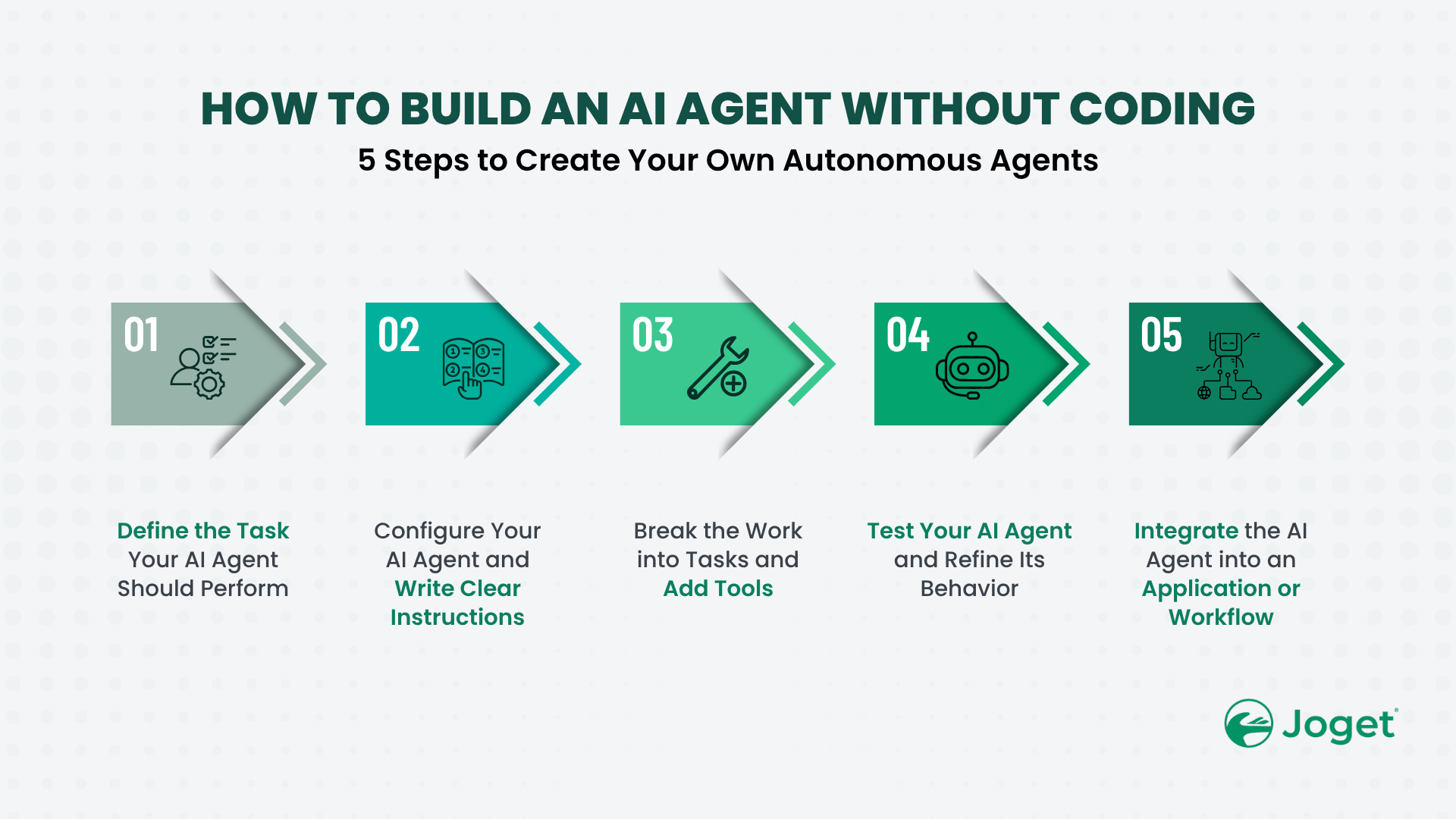
How to Build an AI Agent Without Coding in 5 Steps
Step 1: Define the Task Your AI Agent Should Perform
Before building an AI agent, identify the specific problem you want it to solve. Start with a clear business task rather than trying to create an agent that does everything.
Consider these questions:
- What is the goal? Define the task or outcome the agent should support.
- What information does it need? Identify the forms, documents, databases, or other sources it may need to access.
- What should it produce? Decide whether the output should be a summary, analysis, recommendation, structured response, or another result.
- Where does human input belong? Determine which decisions require review or approval by a person.
For example, a finance team could build an AI agent to review capital expenditure (CapEx) requests, identify missing details and potential risks, and prepare a summary for the approver. The agent could help reviewers assess requests more consistently while leaving the approval decision to people.
Step 2: Configure Your AI Agent and Write Clear Instructions
Once you know what the agent needs to do, define its role and instructions. A well-written prompt helps establish the agent’s responsibilities, the information it should consider, and the format of its response.
A useful starting point is to include:
- Role: What should the agent act as or specialize in?
- Task: What exactly should it do?
- Context: What information or business rules should it consider?
- Constraints: What should it avoid doing, and what limitations must it follow?
- Output format: How should it present its findings?
- Fallback behavior: What should it do when information is missing or unclear?
For example, a CapEx risk analyst agent could be instructed to identify the purpose and amount of the request, summarize the information provided, highlight any missing details, and return the result in a consistent format. It should avoid inventing information and flag cases that require human attention.
Avoid vague instructions such as “analyze this information.” Instead, specify what the agent should analyze and what the result should contain.
Step 3: Break the Work into Tasks and Add Tools
Some tasks can be handled in a single instruction. Others are better organized into several steps.
For example, a CapEx risk analyst agent might need to:
- Retrieve or receive the relevant information.
- Examine it against specified criteria.
- Identify potential issues or missing details.
- Prepare a structured summary.
- Return the findings for review.
Breaking a task into smaller steps makes it easier to understand what the agent is expected to do at each stage. It can also help you identify where a tool or an additional instruction is needed.
Tools extend an agent’s capabilities beyond generating a response. Depending on the configuration and available integrations, tools may allow an agent to retrieve information, query a data source, or interact with another system.
Only provide the access and permissions the agent needs. If a task involves sensitive data or actions that could affect business operations, consider where validation and human approval should be required.
Keep the first version focused. Start with the essential tasks, test them, and add complexity when there is a clear reason to do so.
Step 4: Test Your AI Agent and Refine Its Behavior
An agent that appears to work with one example may behave differently when the input changes. Before using it in a real business process, test it with realistic examples and a range of possible inputs.
Check whether the agent:
- Follows the instructions you provided.
- Produces accurate, relevant, and appropriately structured output.
- Identifies missing or inconsistent information.
- Handles incomplete, unexpected, or ambiguous inputs appropriately.
- Uses its tools as intended.
- Avoids taking actions beyond its defined responsibilities.
For example, test a CapEx risk analyst agent with a complete request, a request missing its business justification, and a request whose figures conflict. Check whether it identifies missing details, flags potential issues, and produces the expected output in each case.
The goal is not simply to see whether the agent produces an answer. It is to understand when its output is useful, where it may fail, and what needs to be improved.
Refine the prompts, task sequence, tools, or output format based on the results. Repeat the tests after making changes.
Testing is an ongoing activity, not a one-time step. Changes to prompts, models, tools, data, or business rules can affect an agent’s behavior.
Step 5: Integrate the AI Agent into an Application or Workflow
Once the agent performs as expected in testing, consider how it should be used in the wider business process.
An agent may be useful on its own, but integrating it into an application or workflow can make its output more actionable. For example, a CapEx risk analyst agent could assess a submitted request and prepare a risk summary before the approver reviews it.
A workflow could follow this sequence:
âž¡ï¸ A user submits a request through an application.
âž¡ï¸The AI agent processes the information and prepares a response or summary.
âž¡ï¸The relevant team member reviews the result.
âž¡ï¸The request proceeds to the next stage based on the business rules.
âž¡ï¸The application notifies the relevant people or requests clarification when necessary.
The exact workflow will depend on the organization’s requirements. The important point is to define where the agent operates, what information it can access, and which actions remain subject to human review.
For organizations exploring how to create enterprise AI solutions, building the agent is only one part of the process. Teams also need to consider how the agent connects to business applications and data, what permissions it requires, where human review is necessary, and how its execution is monitored. These considerations help organizations move from experimenting with AI agents to applying them in real business processes.
Enterprise use should also be accompanied by appropriate access controls, monitoring, and governance. Teams need ways to inspect agent execution, investigate unexpected behavior, and understand AI usage.
Which AI Agent Builder Should You Use?
Several platforms offer tools for building AI agents, including Joget AI Agent Builder, Microsoft Copilot Studio, and Google Cloud Vertex AI Agent Builder.
The right choice depends on your use case, existing systems, technical requirements, and governance needs. Joget AI Agent Builder, part of the Joget Intelligence AI Suite, fits when you want agents to run inside your low-code applications and workflows, on a platform you can host yourself.
When evaluating an AI agent builder, consider how it supports task configuration, tool integration, testing, workflow integration, execution monitoring, and governance. These capabilities can make a difference when moving from experimenting with AI agents to using them in real business processes.
Start Building AI Agents with Joget
Building an AI agent without coding starts with a clear business task, well-defined instructions, the right tools, and careful testing. To put an agent to work in a business environment, you also need to consider how it connects to existing applications and workflows, how its access is managed, and how its activities are monitored.
Joget AI Agent Builder, part of the Joget Intelligence AI Suite, helps users configure AI agents visually using prompts, sequential tasks, tools, and enhancers. Its Preview feature lets you test and refine an agent before integrating it into Joget applications and workflows, without having to write all the underlying orchestration code yourself.
For enterprise use, Joget’s AI governance capabilities also support execution auditing and AI usage monitoring, helping organizations maintain visibility as they introduce AI agents into business processes.
Explore the Joget AI Agent Builder, learn about Joget AI Governance, and discover the Joget Intelligence AI Suite.
Watch AI Agents Being Built with Joget
Want to see how an AI agent can be configured and used in practice? These walkthroughs demonstrate different applications of Joget AI Agent Builder.
| Build a Capital Expenditure (CapEx) Risk Analyst Agent |
Build a BeanShell Analytics Agent |
| See how an AI agent analyzes capital expenditure requests, identifies potential issues, and prepares insights for human reviewers as part of an approval workflow. |
See an agent analyze BeanShell scripts in a Joget application and generate a report containing findings, potential issues, and recommendations. The example demonstrates how AI agents can also support specialized technical analysis. |
| Watch the CapEx Risk Analyst Agent demo |
Watch the BeanShell Analytics Agent demo |
These examples show how AI agents can support different tasks, from business-process analysis to technical script review. The appropriate configuration depends on the task, tools, and data involved.
Frequently Asked Questions
1. How do I create an AI agent without coding?
You can create an AI agent without coding by defining its task, configuring instructions, adding the tools it needs, testing its behavior, and integrating it into an application or workflow. A visual AI agent builder such as Joget AI Agent Builder lets you configure agents through prompts and sequential tasks, without manually writing all the underlying code.
2. How do I build an AI agent for my business?
Start by identifying a specific business problem, such as processing customer enquiries, reviewing information, or preparing reports. Define the information the agent needs, the output it should produce, and which actions require human approval. Then configure and test the agent before integrating it into your business workflow.
3. How do I create enterprise AI solutions using AI agents?
Start with a well-defined business use case and determine how the agent will access enterprise data, interact with existing applications, and fit into business processes. Consider permissions, security, human oversight, monitoring, and governance before deploying the agent in production. A platform such as Joget can help connect visually configured AI agents with enterprise applications and workflows.
4. What is a no-code AI agent builder?
A no-code AI agent builder is a tool that allows users to configure AI agents through a visual interface rather than manually coding the entire solution. Depending on the platform, users may be able to define prompts, organize tasks, connect tools, test outputs, and integrate agents into applications or workflows.
5. What is Joget AI Agent Builder?
Joget AI Agent Builder is a visual tool within the Joget Intelligence AI Suite for configuring AI agents. It supports prompts, sequential tasks, tools, and enhancers, with preview and testing capabilities. Agents can be integrated into Joget applications and workflows.
6. What is the difference between an AI agent and a chatbot?
A chatbot typically focuses on responding to user messages. An AI agent can also be configured to use tools, process information through multiple tasks, and carry out actions toward a defined goal. Some chatbots include agentic capabilities, so the distinction depends on how each system is designed.
7. How do you test an AI agent before deploying it?
Test the agent with realistic inputs, including incomplete information, unexpected requests, and edge cases. Check the accuracy and format of its outputs, how it uses tools, and whether it stays within its intended responsibilities. Refine the configuration and repeat the tests before integrating it into a live workflow.
8. How do you govern AI agents in an enterprise?
Enterprise AI governance can include access controls, defined permissions, execution audit trails, usage monitoring, and human review for important decisions. The appropriate controls depend on the agent’s responsibilities, the sensitivity of its data, and the potential impact of its actions.
9. What is Joget AI?
Joget offers AI capabilities through Joget Intelligence, which brings AI-assisted application development and AI agent building into the Joget platform. Joget AI Agent Builder is a visual tool for configuring AI agents using prompts, sequential tasks, tools, and enhancers. These agents can be integrated into Joget applications and workflows, with governance and monitoring capabilities supporting enterprise use.
Related
Last modified: October 30, 2026